For independent support workers. Not agencies.

Shift notes and invoices, done in under 60 seconds.

Scribe turns your shift into a clean note, an NDIS-ready invoice and a tidy client record, all from your phone, before you've left the driveway.

Start your 14-day free trial

Every feature unlocked for 14 days. No card required. Cancel anytime.

Download on the App Store Get it on Google Play

5.0 on the App Store

Australian built and owned Your data stays in Australia NDIS pricing built in 90,000+ shifts booked in Scribe
The Sunday night problem

You didn't go independent to do paperwork.

You left the agency for the freedom, the better rate and the clients you choose. Nobody mentioned the second job that came with it.

*

Notes written from memory, two days later, at the kitchen table.

*

Invoices that take longer than the shift, hunting down the right NDIS code and rate every single time.

*

Records scattered everywhere, paper in the car, photos on your phone, spreadsheets you stopped updating in March.

Scribe puts the whole lot in one place. You speak it or type it, Scribe tidies it up.

Watch it happen

From shift to sorted in 35 seconds.

Watch a shift go into Scribe: the NDIS code found, the right rate applied, ready to invoice.

How it works

Your whole admin day, in three taps.

These are real screens from the app. What you see here is what you get on day one.

Notes

Type it or speak it. Scribe tidies it up.

Tap out a rough note, or talk for twenty seconds the way you'd tell a mate how it went. Scribe structures your words into clear, professional documentation that reads the way a coordinator expects. It's still your note, in your words. Scribe just handles the formatting.

  • Type or dictate, your choice
  • Professional format, your words preserved
  • Every note timestamped against the shift
Invoicing

Invoice before you leave the driveway.

The right NDIS support item, the right rate for the day and time, travel included, totalled and turned into a clean PDF. One tap sends it to the participant, their plan manager or their coordinator.

  • NDIS codes and rates applied for you
  • Weekend, evening and travel rates handled
  • Xero sync, so tax time takes care of itself
Clients and scheduling

Run it like the business it is.

Repeating shifts set up in seconds, every shift colour-coded from booked to invoiced, and a live view of what you've earned and what's still owing. The full picture of your week, without a spreadsheet in sight.

  • Repeating shifts and client profiles
  • See unpaid shifts at a glance
  • Records ready for plan reviews
Worried about switching?

Setup is the ten-minute part.

You don't need a free weekend or a tech-savvy mate. The whole move happens in three steps.

  1. 1
    Create your account

    An email address and a password. Two minutes.

  2. 2
    Add your clients and rates

    Names, NDIS details and your hourly rates. About five minutes.

  3. 3
    Write your first note

    After your next shift, type it or talk for twenty seconds. Either way, done in under a minute.

Keep your spreadsheet open alongside Scribe for the first week if it helps. Most people never open it again.

Why this exists

Built by someone who's done the shifts.

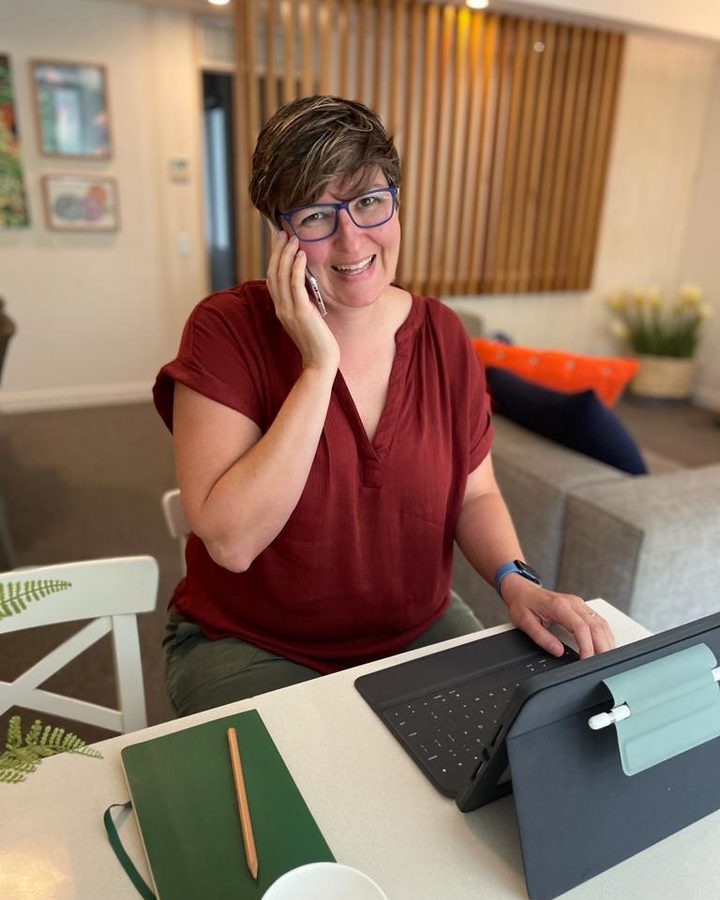
Hi, I'm Kim. I own two support providers and I'm mum to three children accessing the NDIS. For years I listened to support workers say the same thing: the work is the easy part, the admin is what burns you out.

So I built the thing they kept asking for. Not a portal. Not a system. Just a faster, calmer way to run your business from your phone.

"I built this because I know what it's like to spend Sunday nights doing paperwork instead of resting for the week ahead."

Kim Matthews Founder · Support provider · NDIS parent
Kim Matthews, founder of Sparks Scribe, working at her desk
From the community

In their words, exactly as they wrote them.

Real feedback from Australian support workers who use Scribe.

Rated 5.0 on the App Store

"A must have app for any independent support worker. Pays itself off."

dressinggown54 · App Store

"This has been a game changer for me. Super user friendly, and real humans to help you if you need it. A free trial and it's actually super cheap compared to others I looked at."

Kylie S · Facebook

"Simple, intuitive, and backed by amazing support."

Supportworkeranin · App Store

"I love your system, it makes invoicing super easy."

Samantha · TikTok

"I just sent my first invoice for my first shift with Scribe and OMG so easy. The invoice was so comprehensive and easy to send. It seriously took all of 1 and a half minutes to send the invoice and make notes. And all from my phone."

Inner Knowing Respite · Facebook

"Amazing app, easy to use and very helpful to organise my work life."

Pris FG · App Store

"Sparkscribe has been a game changer for me as an independent SW."

Stella · Facebook

"Very easy to use to manage my shifts and note taking. Strongly recommend for independent support workers."

Google reviewer · Google

"Get Sparks Scribe, easy as to set up, all codes mostly are already there."

Amanda D · Facebook

"Sparkscribe is amazing, love it. I finally feel so organised as an independent worker. Easy to use, unlike many others I tried that can be so confusing."

lablove98 · TikTok

"A must have app for any independent support worker. Pays itself off."

dressinggown54 · App Store

"This has been a game changer for me. Super user friendly, and real humans to help you if you need it. A free trial and it's actually super cheap compared to others I looked at."

Kylie S · Facebook

"Simple, intuitive, and backed by amazing support."

Supportworkeranin · App Store

"I love your system, it makes invoicing super easy."

Samantha · TikTok

"I just sent my first invoice for my first shift with Scribe and OMG so easy. The invoice was so comprehensive and easy to send. It seriously took all of 1 and a half minutes to send the invoice and make notes. And all from my phone."

Inner Knowing Respite · Facebook

"Amazing app, easy to use and very helpful to organise my work life."

Pris FG · App Store

"Sparkscribe has been a game changer for me as an independent SW."

Stella · Facebook

"Very easy to use to manage my shifts and note taking. Strongly recommend for independent support workers."

Google reviewer · Google

"Get Sparks Scribe, easy as to set up, all codes mostly are already there."

Amanda D · Facebook

"Sparkscribe is amazing, love it. I finally feel so organised as an independent worker. Easy to use, unlike many others I tried that can be so confusing."

lablove98 · TikTok

"Great app, easy to use, good value for money."

Support work pro · App Store

"I did the free trial and joined up after. Honestly saving me hours sitting at the computer writing notes and sending invoices. I can do it all on my phone in my car between clients if I want. Total game changer."

Kylie S · Facebook

"Sparks Scribe is amazing and simple to use."

PrettyFish3900 · Facebook

"I am so happy I found this, it is so good for the price especially compared to other similar platforms."

Anna · TikTok

"Sparks Scribe Shift Notes has been great for me and it's constantly growing and getting better."

Nathan T · Facebook

"I use Sparks Scribe for invoicing and notes. It's a much better app that lets you keep all your documents in one place. It's absolutely amazing."

Kristy S · Facebook

"Worth the wait, so easy to use. Thank you."

Sara B · Facebook

"This is such amazing and helpful advice. I use Sparks Scribe too and so happy with it."

PrettyHoneybee1989 · Facebook

"I really like the date of birth section. The year of birth scroll is so fast and easy. Great design."

Facebook commenter · Facebook

"Great app, easy to use, good value for money."

Support work pro · App Store

"I did the free trial and joined up after. Honestly saving me hours sitting at the computer writing notes and sending invoices. I can do it all on my phone in my car between clients if I want. Total game changer."

Kylie S · Facebook

"Sparks Scribe is amazing and simple to use."

PrettyFish3900 · Facebook

"I am so happy I found this, it is so good for the price especially compared to other similar platforms."

Anna · TikTok

"Sparks Scribe Shift Notes has been great for me and it's constantly growing and getting better."

Nathan T · Facebook

"I use Sparks Scribe for invoicing and notes. It's a much better app that lets you keep all your documents in one place. It's absolutely amazing."

Kristy S · Facebook

"Worth the wait, so easy to use. Thank you."

Sara B · Facebook

"This is such amazing and helpful advice. I use Sparks Scribe too and so happy with it."

PrettyHoneybee1989 · Facebook

"I really like the date of birth section. The year of birth scroll is so fast and easy. Great design."

Facebook commenter · Facebook

"Most importantly it's quick and simple. I finished a 6 hour shift today and within 10 minutes I had my notes done and invoice sent off. No messing around, including the invoice being sent through to Xero. I used to be a plan manager and I've seen some pretty terrible invoices, and the ones it sends out are clean. I've emailed their team and had a response very quickly too."

Nathan T·Facebook

"I trialled a few and they were over complicated and the wait for support was long. Sparks Scribe has great support, is a great price and has made my paperwork sooo much faster and easier. I'm not spending my weekends or afternoons on my computer, I just do notes when I'm waiting for clients or after a shift."

Kylie S·Facebook
★★★★★

"I highly recommend the Sparks Scribe app for any ISW looking to make the paperwork side of things flow easily. It takes care of your client roster, including notes and important documents. Best part is you can send your invoices without a capped limit. 10 out of 10."

A L·Google

"I can put in client profile, medical records, emergency docs, shift calendar, km, hourly rate and all its variables, do my shift notes and email it as a PDF to the client's support coordinator to assist with plan reviews."

Nicole R·Facebook

"Scribe is absolutely amazing. Gosh, wish it had been around when I began support work all those years ago. You're making life easier for those of us working hard to do the same for others."

Anne-Maree P·Facebook
Over 90,000 shifts already booked in Scribe. Add yours.
Start your 14-day free trial
Pricing

Simple pricing. No lock-in.

Your 14-day trial includes every feature of every plan, free, with no card. Choose a plan only if you stay. All prices include GST.

Essentials

Notes, invoices and your week, sorted.

$15/month

Billed monthly. Cancel anytime.

  • Professional note formatting, typed or spoken
  • Full invoicing with NDIS codes
  • Unlimited clients and shifts
  • Professional PDF exports
  • Phone and desktop
Start free trial
Professionally Protected

Safeguards

Everything you need to stay compliance ready.

$39/month

Billed monthly. Cancel anytime.

  • Everything in Vault, plus
  • Quiet safeguarding checks on every note
  • Incident reports and risk profiles
  • Six consent forms with in-room signing
  • Comprehensive self-audit reports
Start free trial

Not happy in your first 14 days on a paid plan? Full refund, no questions asked.

Questions

The things people ask before they start.

Is my data, and my clients' data, stored in Australia?

Yes. Everything is stored on Australian servers, and your client records belong to you. You can export your data at any time.

Do I need to be good with technology?

No. If you can send a text, you can use Scribe. Most people write their first note and send their first invoice within ten minutes of signing up, and our help centre and tutorials walk you through everything else.

Does it handle NDIS codes and rates?

Yes. The current NDIS pricing arrangements are built in. The right support item and rate are applied to each shift, including weekend, evening and travel rates, so your invoices match what plan managers expect.

Can I use it on my phone?

That's how it's designed to be used. Scribe is built phone-first for iPhone and Android, with desktop access included when you'd rather sit at a bigger screen.

How long does setup take?

About ten minutes. Create your account with an email, add your clients and your rates, and you're ready to write your first note. You can run Scribe alongside your current spreadsheet for the first week. Most people never open the spreadsheet again.

Does AI write my notes for me?

No, you do. You type or say what happened on the shift, and Scribe structures your words into a professional format. It never invents content or adds anything you didn't say, so the note stays your own record of your own observations. On the Safeguards plan, Scribe also quietly checks each note as you save it and flags anything that may need your attention, like a second set of eyes, not a second author. Our full AI Use Statement is linked in the footer.

What happens after the free trial?

Your trial includes every feature of the top plan, free for 14 days. After that you choose a plan from $15 a month, or you walk away. There's no card on file during the trial, no contracts and no exit fees.

I work for an agency. Is this for me?

Scribe is built for independent support workers running their own business, sole traders sending their own invoices. If you're thinking about going independent, the free trial is a good way to see what running your own admin actually looks like.

Still have a question? Chat with us on Messenger and our assistant will sort most things on the spot. Anything it can't, a real person picks up.

Tonight's notes could take 60 seconds.

Start your free trial now and send your first invoice before your next shift ends.

Start your 14-day free trial

No card required. Cancel anytime.

5.0 on the App Store

14-day free trial.
Every feature, no card.
Start free trial